Advanced Certificate Settings
In addition to standard certificate options you can configure advanced certificate settings:
- Extended Key Usages (other than client and server authentication)
- SANS types (other than DNS names)
Extended Key Usages
You can use the extended_key_usages JSON key to specify additional Extended Key Usage extensions beyond those provided by purposes.
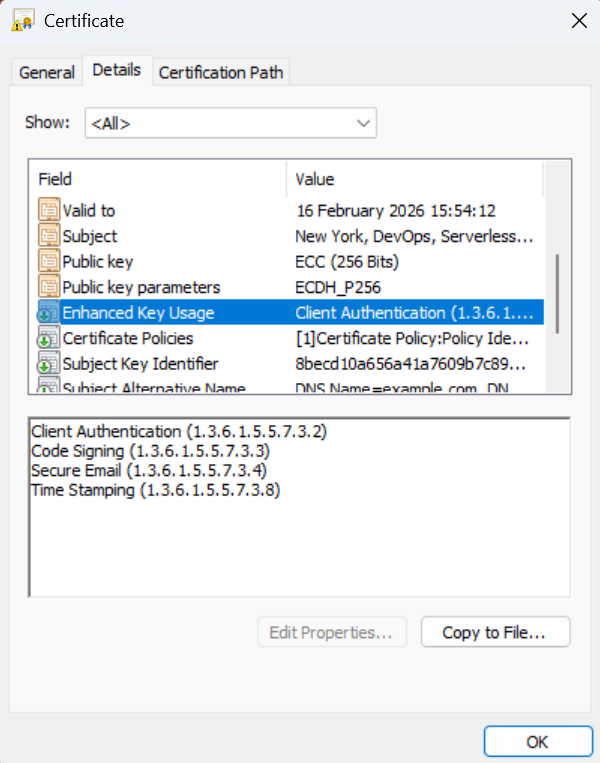
Supported values:
| Value | OID | Description |
|---|---|---|
TLS_WEB_SERVER_AUTHENTICATION |
1.3.6.1.5.5.7.3.1 | Server authentication |
TLS_WEB_CLIENT_AUTHENTICATION |
1.3.6.1.5.5.7.3.2 | Client authentication |
CODE_SIGNING |
1.3.6.1.5.5.7.3.3 | Code signing |
EMAIL_PROTECTION |
1.3.6.1.5.5.7.3.4 | Email protection (S/MIME) |
TIME_STAMPING |
1.3.6.1.5.5.7.3.8 | Trusted timestamping |
OCSP_SIGNING |
1.3.6.1.5.5.7.3.9 | OCSP signing |
IPSEC_END_SYSTEM |
1.3.6.1.5.5.7.3.5 | IPSec end system |
IPSEC_TUNNEL |
1.3.6.1.5.5.7.3.6 | IPSec tunnel |
IPSEC_USER |
1.3.6.1.5.5.7.3.7 | IPSec user |
ANY |
2.5.29.37.0 | Any extended key usage |
NONE |
- | No additional extended key usages |
You can also specify custom OIDs directly, e.g. "1.3.6.1.5.5.7.3.17" for Internationalized Email Addresses.
Example - Code signing certificate:
{
  "common_name": "my-code-signer",
  "purposes": ["client_auth"],
  "extended_key_usages": ["CODE_SIGNING"]
}
Example - Multiple extended key usages:
{
  "common_name": "my-cert",
  "purposes": ["client_auth"],
  "extended_key_usages": ["CODE_SIGNING", "EMAIL_PROTECTION", "TIME_STAMPING"]
}
Example - Custom OID:
{
  "common_name": "my-cert",
  "extended_key_usages": ["1.3.6.1.5.5.7.3.17"]
}
Extended key usages from both purposes and extended_key_usages are combined. Duplicate OIDs are automatically removed.
Subject Alternative Names
The sans JSON key allows you to specify Subject Alternative Names for the certificate. The module supports multiple SAN types and input formats.
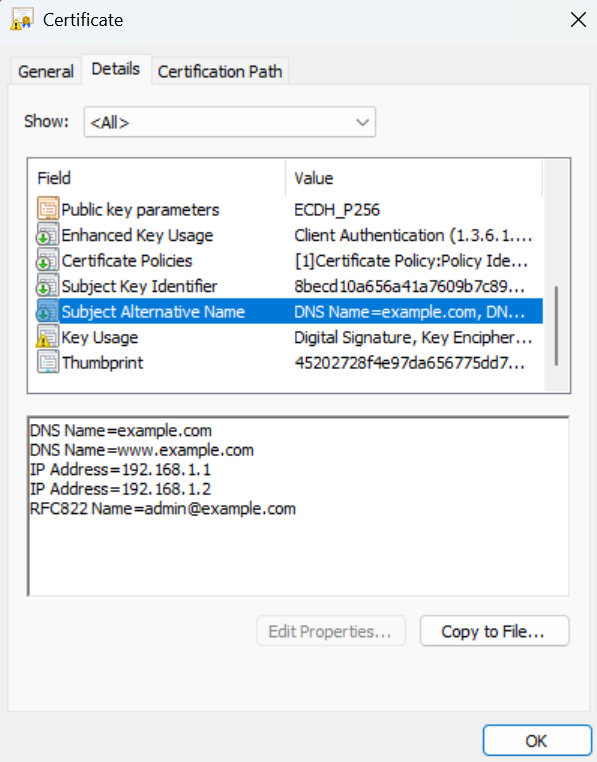
Supported SAN Types
| Type | Description | Example Value |
|---|---|---|
DNS_NAME |
DNS hostname | example.com, *.example.com |
IP_ADDRESS |
IPv4 or IPv6 address | 192.168.1.1, 2001:db8::1 |
EMAIL_ADDRESS |
Email address (RFC822) | user@example.com |
URL |
Uniform Resource Identifier | https://example.com/path |
DN |
Distinguished Name | CN=Example,O=Org,C=US |
Input Formats
The sans field accepts multiple input formats:
No SANs specified (default behavior):
If sans is not specified, the common name will be used as a DNS_NAME SAN if it's a valid domain.
Single DNS name (string):
"sans": "example.com"
Multiple DNS names (list of strings):
"sans": ["example.com", "www.example.com", "*.example.com"]
Multiple SAN types using a map:
"sans": {
  "DNS_NAME": ["example.com", "www.example.com"],
  "IP_ADDRESS": ["192.168.1.1", "10.0.0.1"],
  "EMAIL_ADDRESS": "admin@example.com"
}
Multiple SAN types using a list of objects:
"sans": [
  {"type": "DNS_NAME", "value": "example.com"},
  {"type": "IP_ADDRESS", "value": "192.168.1.1"},
  {"type": "EMAIL_ADDRESS", "value": "admin@example.com"},
  {"type": "URL", "value": "https://example.com"},
  {"type": "DN", "value": "CN=Partner,O=Partner Org,C=US"}
]
Validation
All SAN values are validated based on their type:
- DNS_NAME: Must be a valid domain name (wildcards supported)
- IP_ADDRESS: Must be a valid IPv4 or IPv6 address
- EMAIL_ADDRESS: Must be a valid email address format
- URL: Must be a valid URL
- DN: Must contain at least one valid DN attribute (e.g., CN=, O=, OU=, C=)
Invalid SANs are logged and excluded from the certificate but do not cause the request to fail.